LinkedIn Tools
Puts LinkedIn automation behind review queues, approval gates, and reconciliation, so risky browser work stays controlled.
Project overview
LinkedIn Tools overview
A short overview of the problem, solution, and result.
Starting Point
LinkedIn networking, recruiter outreach, opportunity discovery, comment extraction, and acceptance follow-up work were too risky to run as scattered browser scripts.What Shipped
One CLI exposes the active network, recruiter-agency, opportunity, comments, and review UI namespaces.Why It Mattered
Moved LinkedIn automation behind controllers with source contracts, reconciliation reports, candidate reservoirs, acceptance ledgers, review queues, and token-gated action pages.Summary
LinkedIn Tools is a public Python monorepo for guarded LinkedIn automation.
It brings networking, recruiter and agency outreach, opportunity research, comment extraction, browser artifacts, and review surfaces under one controller-led system. The point is not to click faster. It is to make every click owned, gated, and reviewable.
The situation
Browser automation is easy to demo and hard to trust.
The risky part was not clicking LinkedIn buttons. It was knowing which workflow owned each action, whether that action was allowed, what evidence was captured, and how to reconcile the result when the browser or platform state was uncertain.
How it works
Give each workflow an owner.
Connection requests, acceptance tracking, accepted follow-ups, and pending-invitation cleanup live under the network controller. Recruiter and agency outreach owns account sourcing, lead capture, drafts, dashboards, dry runs, and guarded message sends. Opportunity intelligence ranks buyer-signal comments but does not send, connect, or withdraw.
Keep real actions close to approval flags.
Send-capable commands keep real-action flags next to the browser operation. The code distinguishes guarded dry runs from explicit allow-send and allow-withdraw paths.
Treat audit evidence as part of the product.
The system stores source runs, capture artifacts, audit results, candidate reservoirs, acceptance ledgers, extracted comments, ranked comments, browser artifacts, and blocked states so a run can be inspected later.
Product surface
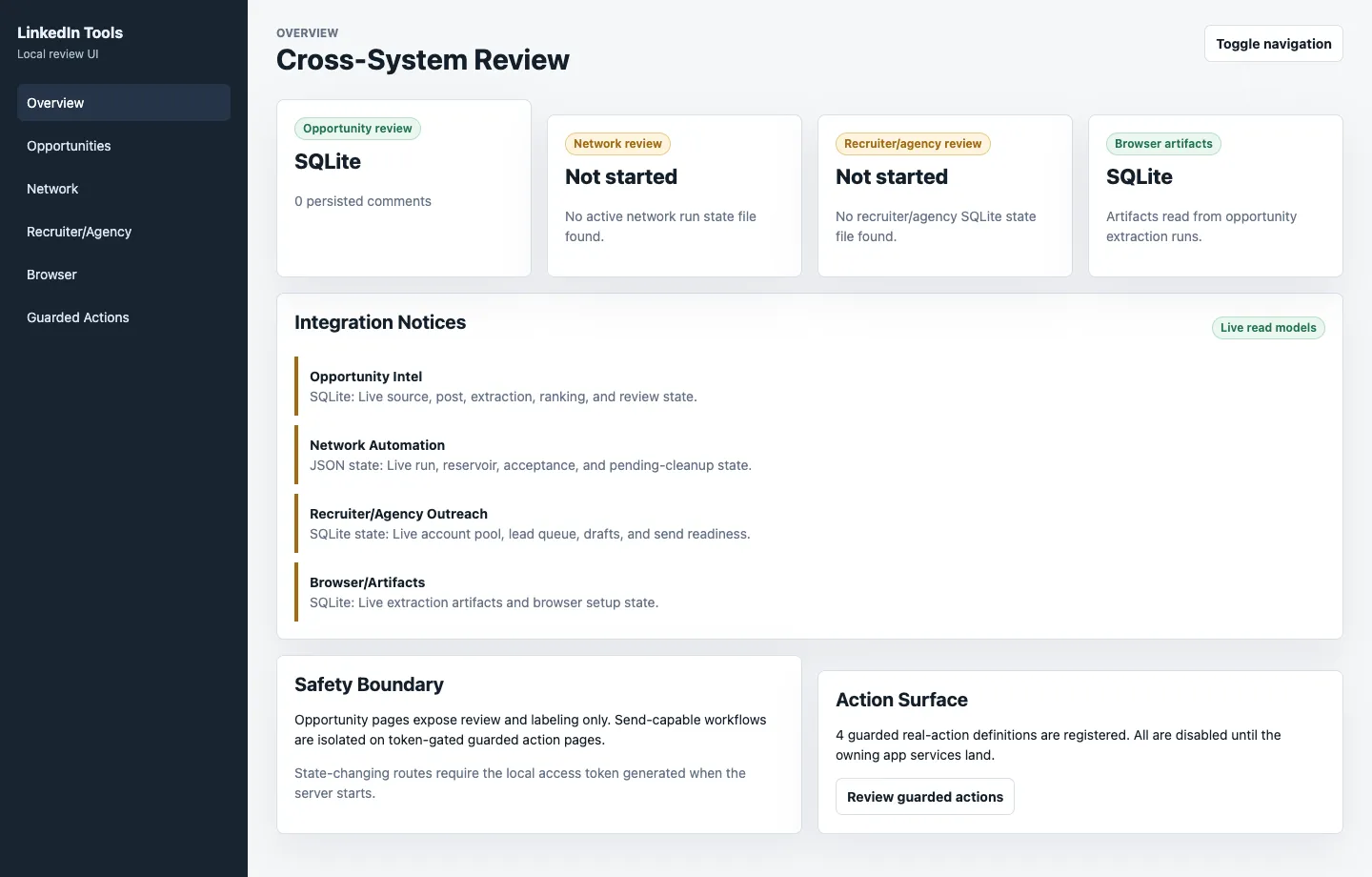
The local review UI is a FastAPI and Jinja surface for opportunities, network state, recruiter and agency queues, browser artifacts, and token-gated guarded actions.
The screenshot below uses isolated temporary state, so the page can show the shipped UI without exposing local LinkedIn runtime data.
What I built
A network automation controller.
The network namespace owns Sales Navigator connection-request runs, saved-search capture, candidate reservoirs, sent-page audit reconciliation, acceptance checks, accepted follow-up drafts, browser sessions, and pending-invitation cleanup.
A separate recruiter and agency workflow.
The recruiter/agency namespace handles account sourcing, lead capture, message drafting, dashboarding, dry runs, and guarded message sends. Tests enforce boundaries such as requiring Sales Navigator identity before promoted agency contacts can become send-ready leads.
A recommend-only opportunity rail.
The opportunity namespace defines source registries, query packs, provider imports, post queues, browser-backed search capture, source experiments, and review exports. The v0 source batch includes 38 enabled sources and a scoring model for problem fit, buying signal, buyer fit, actionability, and immediacy.
Comment extraction that can resume.
The comments namespace supports saved-HTML and browser-backed LinkedIn post comment extraction, safety limits, progress output, SQLite persistence, artifacts, queue checkpoints, and retry metadata.
A review UI over the same state contracts.
The UI reads from SQLite and JSON state to show opportunity sources, post queues, extraction runs, ranked comments, experiments, calibration rows, network runs, acceptance drafts, pending cleanup, recruiter leads, browser sessions, and guarded actions.
What shipped
LinkedIn Tools is a practical example of controller-led browser automation: state first, action ownership second, and audit evidence available when the browser result needs to be checked.
Controller namespaces
One CLI owns the active workflows.
The public repo exposes network, recruiter-agency, opportunity, comments, ui, and cutover namespaces from the top-level linkedin-tools command.
Safety boundaries
Send-capable workflows have clear owners.
Network automation owns connection requests and accepted follow-ups. Recruiter/agency outreach can send drafted messages only. Opportunity intelligence is recommend-only.
Browser actions
Real actions require approval flags.
Browser-backed sends and withdrawals default to guarded behavior and require allow-send or allow-withdraw near the command that takes the action.
Audit state
Uncertain browser work leaves evidence behind.
Runs write controller state, browser artifacts, sent-page audits, reconciliation reports, source queues, extracted comments, rankings, and blockers into app-owned state.
Verification
Tests cover workflow contracts.
Tests cover network reconciliation, source registries, post queues, browser primitives, recruiter/agency lead state, storage migrations, and the review UI.
Why it matters
This is how I would shape the same kind of workflow inside a company once spreadsheets, chat threads, and ad hoc scripts start to break down.
Define ownership. Store the workflow state. Gate irreversible actions. Capture evidence. Make the next action visible. Let automation run only where the system can explain what happened.
Public repo
The repository is public and contains the Python monorepo, CLI namespaces, source registries, review UI, browser primitives, fixtures, and tests.
View GitHub repo →
Tech Stack
Find what's slowing your operations down.
A Business Systems Audit maps the workflow, identifies where the process gets stuck, and gives you a first build plan.