Job Application Assistant
Keeps each job posting, draft, cover letter, PDF, and application record connected from first review to submission.
Project overview
Job Application Assistant overview
A short overview of the problem, solution, and result.
Starting Point
Applying to jobs was split across job boards, extension popups, local portfolio context, cover-letter drafts, PDFs, and a separate tracking habit.What Shipped
Chrome extension side panel for extraction review, draft requests, PDF actions, already-applied checks, and apply-enabled posting lists.Why It Mattered
Created a public local workflow where the applicant-facing text, audit trail, generated PDF, and application ledger remain inspectable on the machine.Summary
Job Application Assistant is a local tool for drafting and tracking job applications.
It combines a Chrome extension, a FastAPI backend, SQLite, local portfolio context, Codex draft generation, and cover-letter PDF export. The important part is that the draft, the source job, the chosen project evidence, and the application ledger stay connected.
The situation
The application workflow had too many loose pieces.
The job board had the posting. Local files had positioning and project examples. Drafts lived in a chat or text box. Cover letters had to become PDFs somewhere else. Application history was another habit to maintain. It was too easy to lose the link between the role, the claim used, the final PDF, and whether the application was already logged.
How it works
Keep sensitive state local.
The extension keeps browser state in Chrome. The backend stores draft jobs and application records in SQLite. Generated PDFs live under the configured runtime directory, and generated context stays in a local cache. The README is explicit that drafting uses the locally configured Codex/OpenAI account. The app does not add analytics or job-board API calls.
Treat extraction as a contract.
Supported job pages become an OpportunitySnapshot with fields like source URL, title, company, location, description, responsibilities, requirements, skills, questions, company context, recruiter context, and extraction warnings. Missing data stays missing.
Make the draft inspectable.
The backend builds one prompt from the job snapshot plus local profile, resume, offers, and project evidence. The model has to return strict JSON, including the draft and the audit fields needed to check why a claim was used.
Product surface
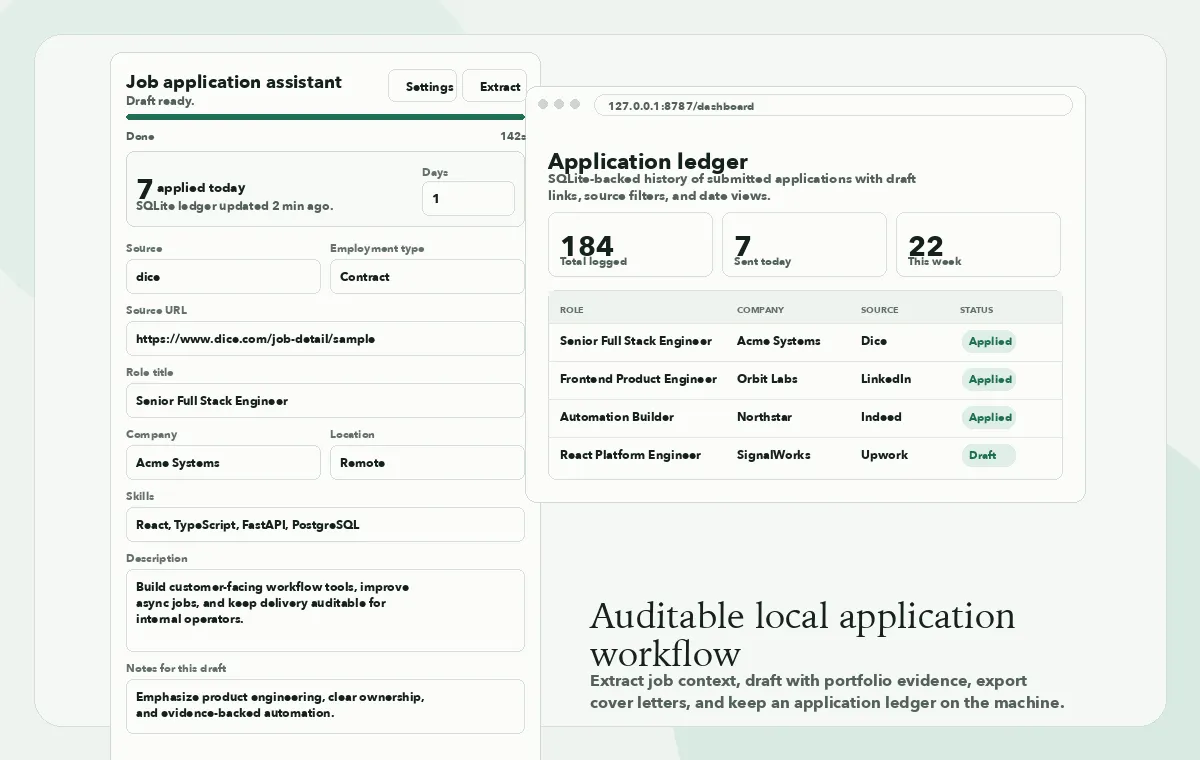
The main product surface is the extension side panel. The local dashboard sits behind it for the application ledger.
What I built
Extension adapters for real job pages.
The extension supports Upwork, Dice, Indeed, ZipRecruiter, Robert Half, and LinkedIn page shapes. It uses platform adapters, structured selectors, Dice JobPosting JSON-LD when available, and reviewable side-panel fields before a draft starts.
A local context and drafting backend.
The backend indexes profile Markdown, offer JSON, project evidence JSON, and resume text into a ContextBundle. Draft jobs run asynchronously, persist request and result JSON, expose polling status, and record stage and Codex subprocess timing metadata.
Application tracking in the same workflow.
Application records are stored in SQLite and deduplicated by normalized source URL. The extension can check whether the current source URL already exists, and the local dashboard supports search, filters, date views, sorting, pagination, and draft links.
Cover-letter PDFs as saved artifacts.
The PDF exporter renders the saved draft text without rewriting it, derives a restrained letterhead from the configured resume PDF, omits phone-like contact items, names files by company, reveals generated files in Finder, and archives submitted cover letters when an application is logged.
Apply automation with review points.
The result-page side panel can list apply-enabled postings and open selected Dice, Indeed, and LinkedIn flows. Platform helpers can attach generated cover-letter PDFs and record confirmed applications. Unfamiliar application questions stay manual.
What shipped
Job Application Assistant is built around the contract between extraction, context, drafting, artifact generation, and ledger state. It is not trying to be a black-box application agent.
Extension surface
The side panel handles review, drafting, PDFs, and application status.
It shows the current job snapshot, source URL, role fields, notes, draft controls, PDF actions, already-applied status, and apply-enabled posting lists.
Local backend
FastAPI owns the durable parts of the workflow.
The backend provides health checks, context reindexing, draft jobs, draft lookup, application lookup, dashboard, and PDF endpoints. SQLite stores jobs, drafts, timing metadata, and application records.
Audit trail
Drafts come back with reasons attached.
Each Codex response includes the applicant-facing answer plus the angle, role classification, strategy, selected and rejected projects, decisions, claims, caused_by references, and warnings.
Extraction discipline
The prompt gets structured fields instead of page-wide guesses.
The opportunity model rejects unknown fields and removes obsolete freeform fields before prompt construction. Extraction tests also block broad weak-inference patterns.
Verification
The repo checks both Python and extension code.
The check script runs mypy, pytest, JavaScript syntax checks for extension files, JSON validation for the manifest and response schema, and git whitespace checks.
Why it matters
The useful part is not that the system can write a cover letter.
The useful part is that every draft stays tied to the job snapshot and the allowed portfolio evidence. Every application can be checked against the ledger, and every generated PDF remains part of the same local workflow.
Public repo
The project is open source, including the Chrome extension, FastAPI backend, SQLite stores, response schema, and Python and extension tests.
View GitHub repo →
Tech Stack
Find what's slowing your operations down.
A Business Systems Audit maps the workflow, identifies where the process gets stuck, and gives you a first build plan.