Acquire
Keeps leads, notes, drafts, follow-ups, and submission records together in one local workflow, so opportunities do not disappear between tools.
Project overview · 42 seconds
I built a local acquisition-tracking product
I built a local acquisition-tracking product because the acquisition workflow was failing despite having plenty of tools.
Each tool owned only part of the workflow. Job boards had listings. LinkedIn had applications. Notes had context. Browser tabs had forms. Chat sessions had drafts. None could answer the operational question: what should happen next, and is it safe to automate?
I built one local workflow from discovery to submission
Acquire started as a place to track project opportunities and grew into one workflow for source monitoring, opportunity review, application preparation, answer reuse, outreach drafting, browser-assisted submission, evidence timelines, and a daily desktop view.
The system keeps sensitive data on the machine and makes approval part of the workflow before an agent or browser can take an external action.
The database owns state while people own judgment
Keep the source of truth local.
Acquire stores the pipeline in a local SQLite database and exposes a stable Rust command-line tool for opportunities, events, research runs, application materials, reusable answers, outreach, reports, schedules, and the desktop app. Sensitive opportunity, application, and outreach data stays on the machine.
Separate judgment from workflow ownership.
Codex and Playwriter handle research, scoring, drafting, and visible browser tasks where judgment is useful. The Rust application owns saved state, validation, queue changes, approval records, and reports.
Require evidence before external actions continue.
A final application submission or outbound message needs its prerequisites, approved inputs, and run evidence. If any of those are missing, the action stops in a visible blocked state that can be resumed safely.
The desktop app shows the next action and its evidence
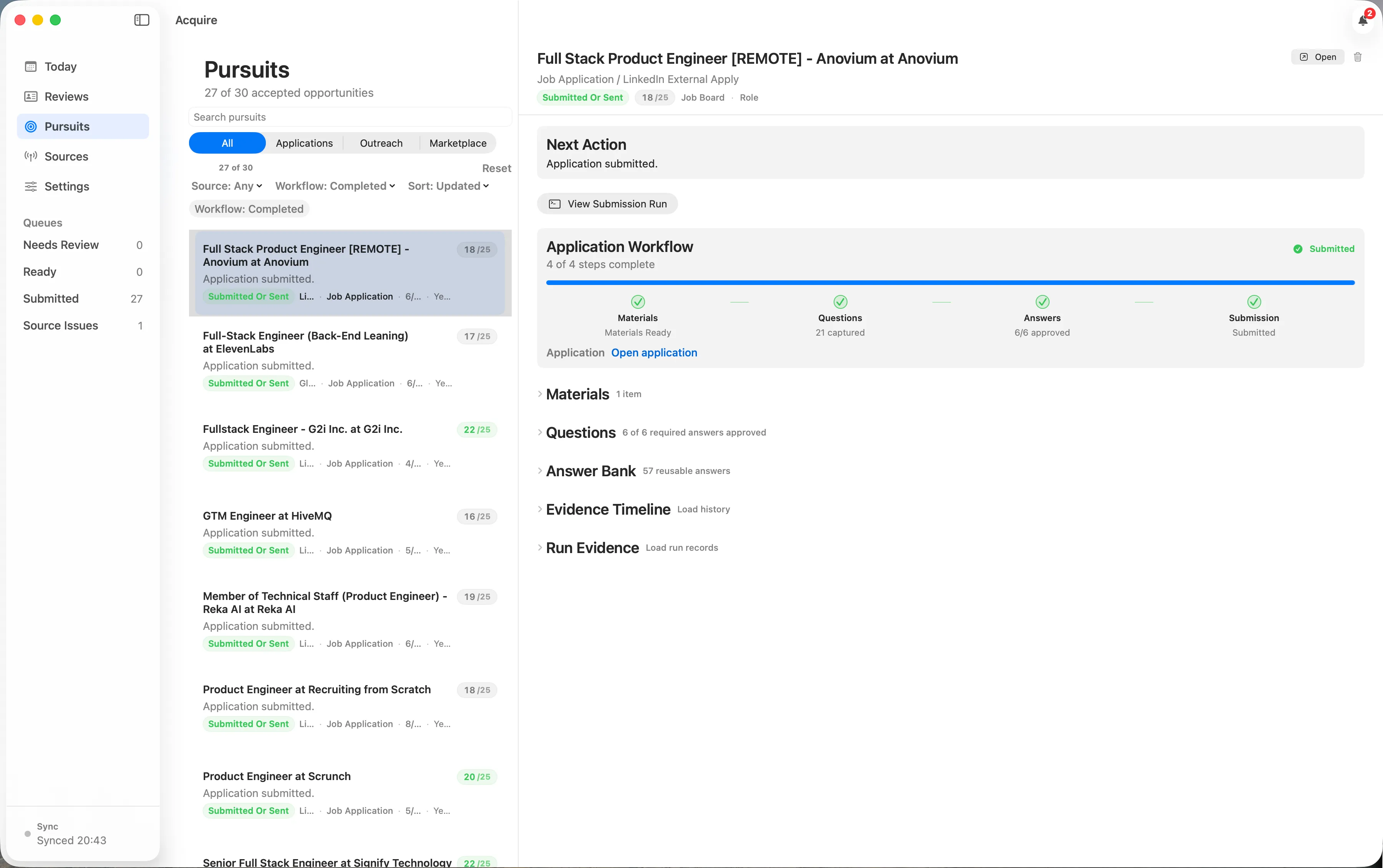
The macOS app is the daily workspace. Its Pursuits view keeps applications, outreach, marketplace proposals, answer review, material status, submission evidence, and completed history together.
I made each stage inspectable and recoverable
Bring opportunity sources into one record.
The Rust application manages opportunities, interaction history, research runs, imports, duplicate checks, reports, schedules, notifications, and read-only monitoring across job boards, agencies, recruiters, Upwork, Wellfound, Glassdoor, LinkedIn, YC, We Work Remotely, and Hacker News.
Make every application stage explicit.
An application moves through a defined sequence: opportunity acceptance, material generation, resume attachment, portal-question discovery, reusable-answer matching, required-answer approval, final approval, submission, and confirmation.
Reuse approved answers without hiding changes.
The answer bank stores reusable facts and maps employer-specific portal wording to approved answers. New or changed required fields invalidate submission approval and return the pursuit to review instead of letting stale answers continue.
Move daily decisions into the desktop app.
The macOS app shows opportunity reviews, active pursuits, source health, schedules, prompt settings, application materials, questions, answers, run evidence, and blockers from the same saved state.
Run background tasks through one service.
Source schedules, queues, material and draft generation, application submission, outreach, and notifications moved into one background service instead of scattered macOS jobs and ad hoc scripts.
One system now carries each pursuit from source to record
Acquire is the clearest example of the projects I want to do more often: understand a fragmented workflow, define its control points, then build the internal software system that lets the workflow scale.
Opportunities, applications, and follow-ups share one history.
Acquire keeps opportunities, research runs, application materials, outreach drafts, reusable answers, evidence, scheduled jobs, and reports in one local database.
The next action is visible in one desktop app.
The macOS app brings today's tasks, reviews, active pursuits, sources, and settings together while the underlying database remains the source of truth.
Automation runs through explicit review points.
Opportunity, draft, material, answer, and final-submission reviews prevent agent and browser actions from changing the pipeline without approval.
Interrupted background tasks can resume or be inspected.
One background service runs source checks, draft generation, application preparation, outreach, and submissions so interrupted tasks leave a visible state.
Every important decision remains inspectable.
Research, scores, application materials, suggested answers, submission records, source reports, and blockers stay attached to the pursuit instead of disappearing into chat history.
The same pattern applies to other fragmented operations
Acquire supports one business function: finding and pursuing work. The same approach applies when a growing company has outgrown spreadsheets, inboxes, and founder memory.
I start by mapping the real workflow and naming where its record lives. Automation comes later, at the points where the system can prove what happened, recover from blockers, and keep people responsible for the approvals that matter.
Tell me what your team needs to ship.
Start with the feature, integration, or system that's stuck. We'll work out whether a project or a monthly contract fits.